The Tascam Series 208i audio interface debutted during NAMM 2019 and was released into the wild in early 2020, just in time for the COVID-19 plague. The 208i has a similar form factor to the Tascam US 4x4 but upgraded with additional features and improved specifications. Herein are my thoughts on using the 208i on my Mac computers for the past few years.
What is an Audio Interface?
If you're interested in the Tascam Series 208i, you probably know what an audio interface is. But just in case you don't, an audio interface is simply a hardware device that converts sound from microphones and musical instruments into digital data for your computer and vice versa, converting digital audio back into analog signals for headphone and speaker playback. The main reasons to use a dedicated audio interface, rather than the built-in sound of a computer, are higher sound quality and increased input and output options.
“Musicians need expensive toys...”
Audio interfaces have become so popular that specialized models for streamers, podcasters, and musicians have multiplied like rabbits. The Tascam Series 208i is aimed squarely at musicians recording with a DAW in a home studio. Although the 208i can be used for podcasting and streaming, it is not the best choice. Zoom calls don't need 192kHz WAV recording, 20 inputs, MIDI, or word clock in/out ports. Okay, onwards to the Tascam Series 208i review.
Outer Case
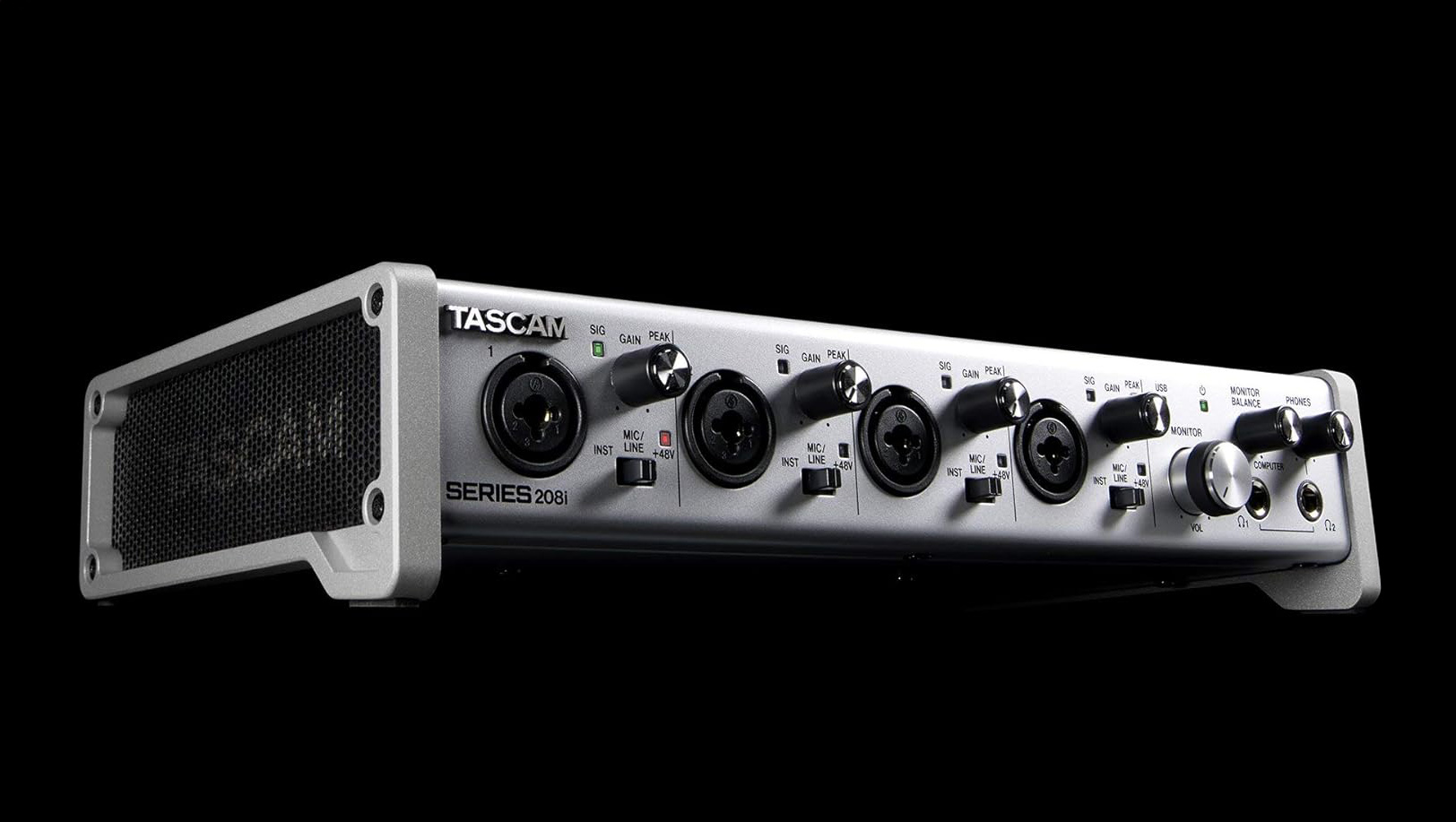
The 208i feels and looks premium. The beefy outer case looks like aluminum due use of metallic paint, but is actually rolled steel supported by a bolted-on upward-tilted aluminum stand. No plastic other than the knobs, switches, and input/output moldings. This unit is both handsome—the silver paint color matches my Mac Studio—and hefty, making it resistant to moving when fiddling with knobs and switches. Plus, all that steel and aluminum provide great RFI shielding.
Tascam Series 208i | Image courtesy Tascam
Controls
All major functions have physical controls, and these controls are reasonably spaced and labeled, albeit in a tiny font. Dials and switches have no wobble or play. Ditto for the outputs and inputs. Knobs rotate smoothly but with some resistance, minimizing the likelihood of inadvertent adjustments.
I prefer large preamp and headphone gain dials. Not a deal breaker, but the tiny dials are a bit fiddly. The thin black on-chrome level indicator line on dials is hard to see. A black dial with a white or luminous line would be easier to see, especially in the typical dimly lit studio.
Each individual XLR input has its own gain dial and dedicated phantom power/line/instrument switch and LED indicator, allowing simultaneous use of condenser mics, dynamic mics, and electronic instruments. The Tascam US 4X4 and US 4x4HR only have one phantom power switch for all four mic preamps.
Signal input and clip LED indicators are provided for each XLR channel. Thus, precise gain staging can only be set in the DAW.
Power
I appreciate that the 208i has a power switch, unlike many interfaces. It is tiny and rear-mounted, so you have to position the 208i so you can access the switch. Power is supplied by a 12-volt wall wart, not USB, which isn’t ideal but works fine.
Connectivity
Inputs
The 208i is billed as a 20-in/8-out design, burying the prior US 4x4 and current US-4x4HR in terms of connectivity choices. However, the primary audio inputs for the 208i are the four front-mounted XLR combo jacks with integrated TRS inputs for line-level signals or instruments. The combo jacks feed into Tascam's Ultra-HDDA mic preamps.
Tascam Series 208i | It has a power switch! | Image courtesy Tascam
Where are the other 16 inputs in this 20-in/8-out design? You need an ADAT channel expansion unit such as the Behringer ADA8200 ($180) or Tascam SERIES 8p Dyna ($600 USD) and jack them into the two optical S/MUX (ADAT) expansion ports. Each S/MUX port supports 8 channels, so with one Behringer ADA8200 or SERIES 8p Dyna, you get 8 more channels. Two Behringer ADA8200 or SERIES 8p Dyna yield 16 channels. I rarely need more than four XLR inputs, but for those recording live ensembles or huge drum kits, Tascam has you covered.
Aggregate Device
If you're a Mac user, you can also add more input channels to the 208i (or any interface) by creating an Aggregate Device. This process works by using Apple's Audio MIDI Setup app (Applications>Utility folder) to link multiple audio interfaces. Many home recordists have a spare audio interface at hand for the occasional session when a few more inputs are needed.
Outputs
Output is via two full-sized (1/4") stereo headphone jacks and eight balanced TRS mains. The TRS cable should be wired as Tip, HOT; Ring, COLD, and Sleeve, GND. I prefer XLR outputs but, of course, the 208i would need to be much larger. Eight TRS outs are enough to monitor and mix 7.1 surround sound. I use TRS 1 and 2 for output to my KRK Rokit 5 monitors.
If you need to connect MIDI devices such as controllers, drum machines, and synths, MIDI in/out ports are provided on the rear panel.
USB
The 208i uses a USB-B port, common on printers and scanners, for connection to computers. A USB-B to USB-A cable is included in the box. Tascam should have updated the 208i to USB-C years ago. The increased bus power over the old USB 2.0 standard could eliminate the wall wart power supply. With that complaint stated, once I plugged it into my Mac, I didn't touch the USB cable ever again...
No Mac Drivers Needed
The 208i is Core Audio compliant, which means it’s plug-and-play on the Mac, requiring no drivers, at least with Mojave (OS 10.14) and later OS versions. Windows need a driver. I’ve used the 208i extensively with an iMac Pro, MacBook Pro, and Mac Studio M4 Max using various DAWs, including TwistedWave, GarageBand, Adobe Audition, and Logic Pro X, and have achieved impressive results. I simply power on the interface before opening the DAW, and the 208i is automatically recognized. In contrast, other interfaces I’ve owned required drivers and computer restarts for the interface to be recognized.
Tascam Control
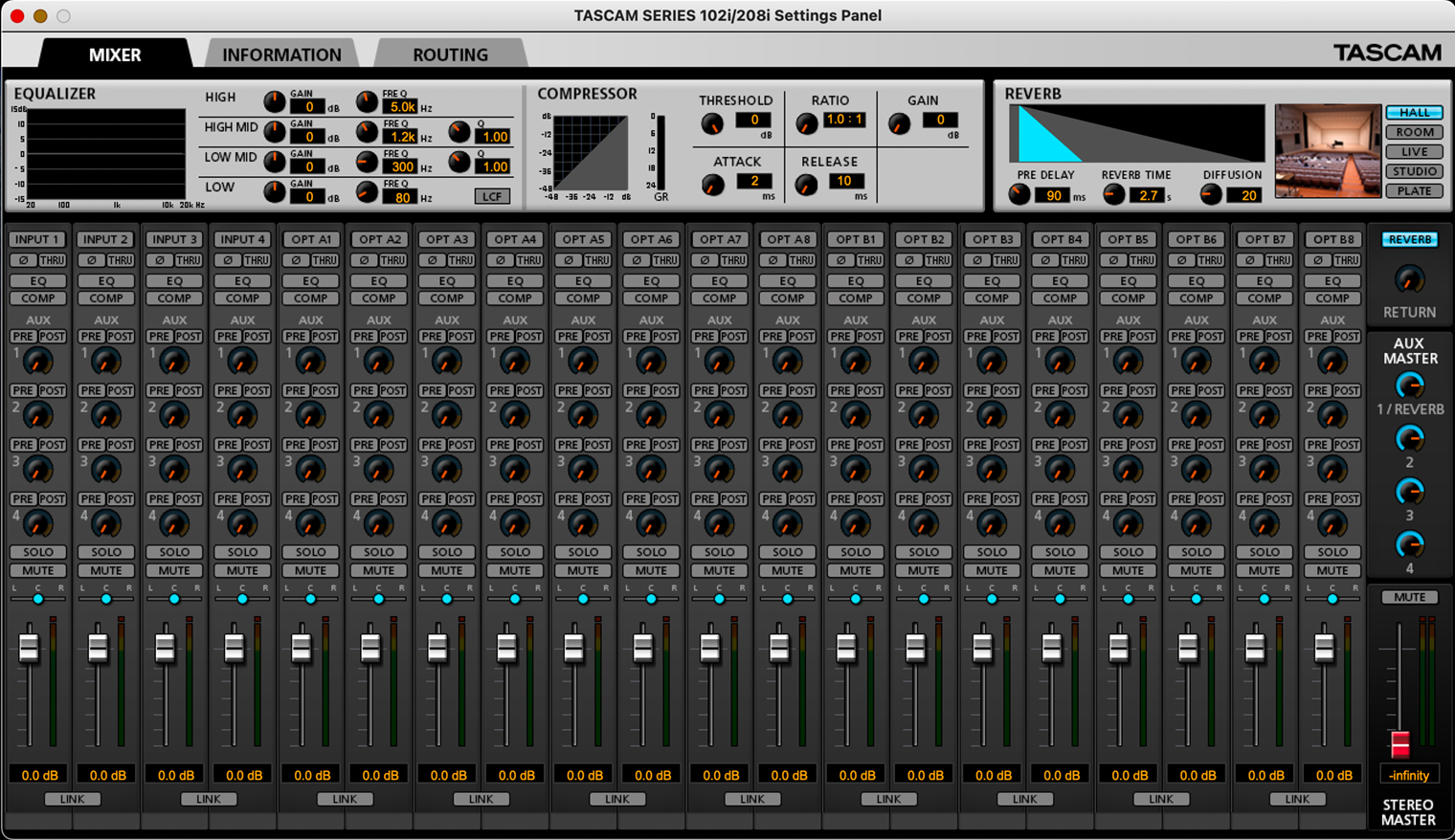
The 208i worked flawlessly every time I switched it on, except when I tried the free Tascam Control software for this review. Control is a software emulation of an eight-bus input/output mixer. You can update firmware, diddle routing, tweak levels, and access hardware-based DSP, e.g., reverb, compressor, phase invert, and 4-band EQ. Most of these features are in DAW software, and better implemented, making Control a solution for a problem that doesn't exist.
Tascam Control | The last software update for Mac OS was 06-26-2019.
Out of Control
Control causes Logic Pro X to lose audio output and, oddly, conflicts with Elgato Stream Deck, disabling all functions. I'm writing this review during January 2026 and the latest Control version on Tascam's website is dated 06-26-2019, the original release date. Control may have been a one-shot deal or was simply abandoned. Catalina (OS 10) was current in late 2019 and my Mac Studio is on OS 15.7. I uninstalled Control and everything worked perfectly again.
I've used Tascam products for decades, started with a Portastudio and DAT in the 1990s, and owned many of their field recorders. While I understand that Tascam primarily focuses on hardware, like camera companies, they’re not known for their attentiveness when it comes to software updates. Fortunately, I can’t recall a reason why I’d want to use Control. Logic Pro X offers all the mixing flexibility and effects plugins I need.
Sound Quality
I record multitrack and stereo recordings of classical guitar and ukulele, mostly demos for courses I teach or for my YouTube channel. For guitar, I use Neumann KM 184 and TLM 102 condenser mics, which deliver a crystal-clear sound on the 208i and need very little EQ tweaks. Tascam's Ultra-HDDA mic preamps are extremely clean.
Sweet Kate | Neumann TLM 102, Tascam Series 208i and Logic Pro X | Hirade H8SS classical guitar in a multi-track recording (mic pointed at the bridge).
Below is a sample track of my wife and I playing Bach's “Sleepers Awake.”
Sleepers Awake | Ching and Kremona classical guitars, Neumann KM 184 (2X), Tascam Series 208i and Logic Pro X
Gain
I mainly use condenser mics, and the 57dB gain available on the 208i is ample for classical guitar. A close-mic’d Neumann KM 185 only needs about 35dB of gain. For occasional talking head or voiceovers, I prefer the sound of dynamic mics. For my voice, the maximum preamp gain of 57dB is a little on the low side for dynamic mics. However, the preamps are very clean when cranked at or near maximum gain. While it’s sufficient for a Shure Beta57 and KSM8 at 4 to 8 inches from my mouth, it may not be enough for the gain-hungry SM7B. An additional 10dB of gain would be ideal.
Note Duration | Talking head and voiceovers recorded with the 208i, Rode PodMic and Logic Pro X. Audio and video assembled in Final Cut Pro.
Monitoring
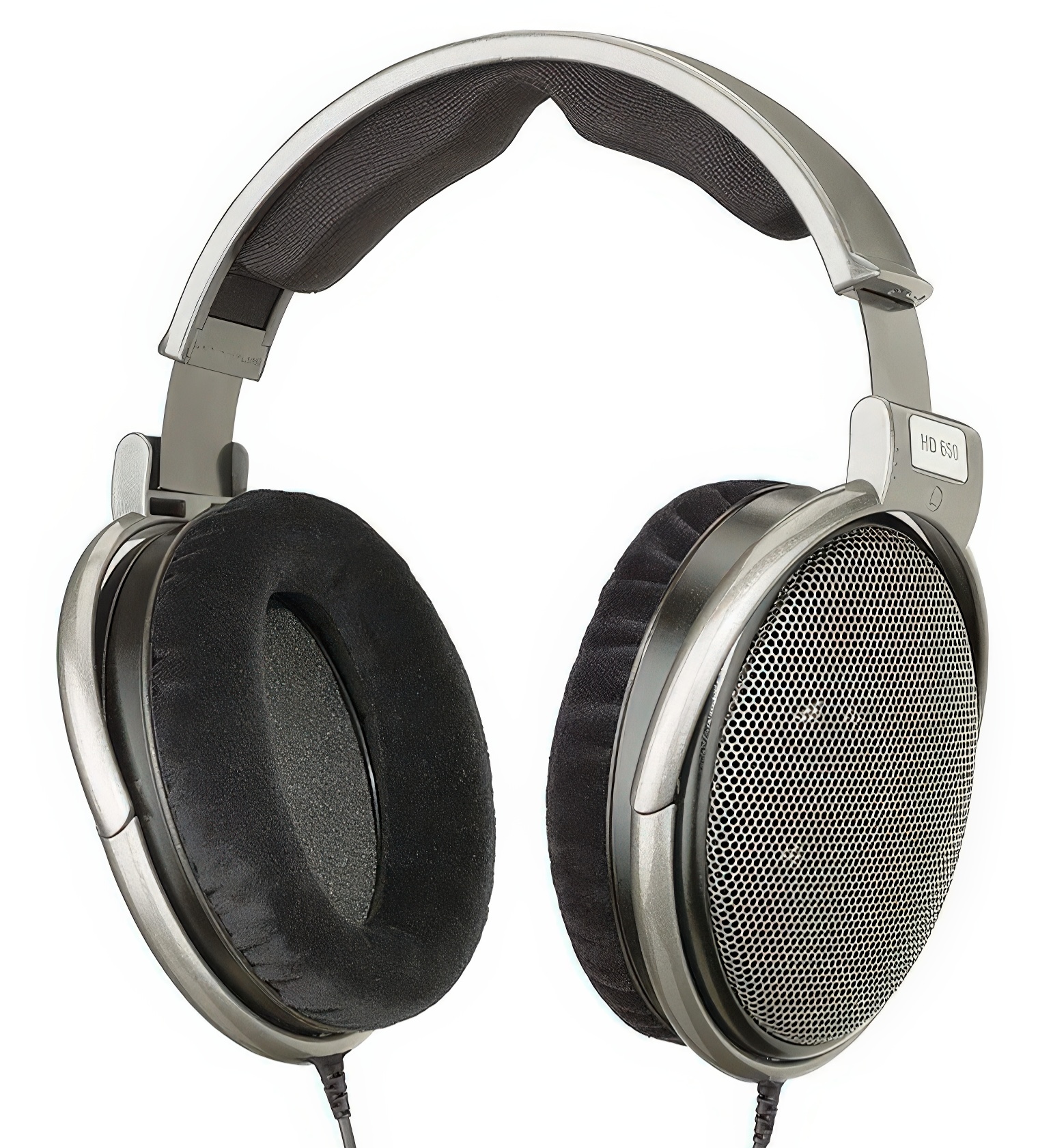
I do much of my tracking and editing with headphones, so headphone output quality is crucial to my workflow. Some headphone amps are too weak for high-impedance cans or prone to hiss and distorition. The 208i headphone amp sounds great and has plenty of gain to drive 300 Ohms (Ω) Sennheiser HD650 and HD580 headphones. Volume is actually too loud past the 9:00 position. Does it best the headphone amp in the Topping E2x2 OTG? Nope, but it's not too far behind.
Yellow Bird | Hirade TH90, Romero Creations Tenor 6, Neumann KM 184 (2X), Tascam Series 208i and Logic Pro X
For my final edit check, I use monitors. I have the TRS mains 1 and 2 routed to a pair of KRK Rokit 5 Generation 5 monitors. The Tascam DAC renders audio clearly and accurately, albeit slightly brighter compared to my MOTU Ultralite.
Aura Lee - Love Me Tender | Hirade TH8SS, Neumann KM 184 (2X), Tascam Series 208i and Logic Pro X.
Files from Field Recorders
I often use a Tascam DR-60 MK II or Zoom F3 to capture audio from nature, stage performances and video sessions. Field recorders are not useful for editing or mixing. Thus, I import these tracks into Logic Pro X for editing and use the 208i for monitoring. After editing, I sync the audio tracks to the video clips in Final Cut Pro. Since buying the 208i in 2022, I've used it to edit and mix the audio for over 100 videos on my YouTube channel.
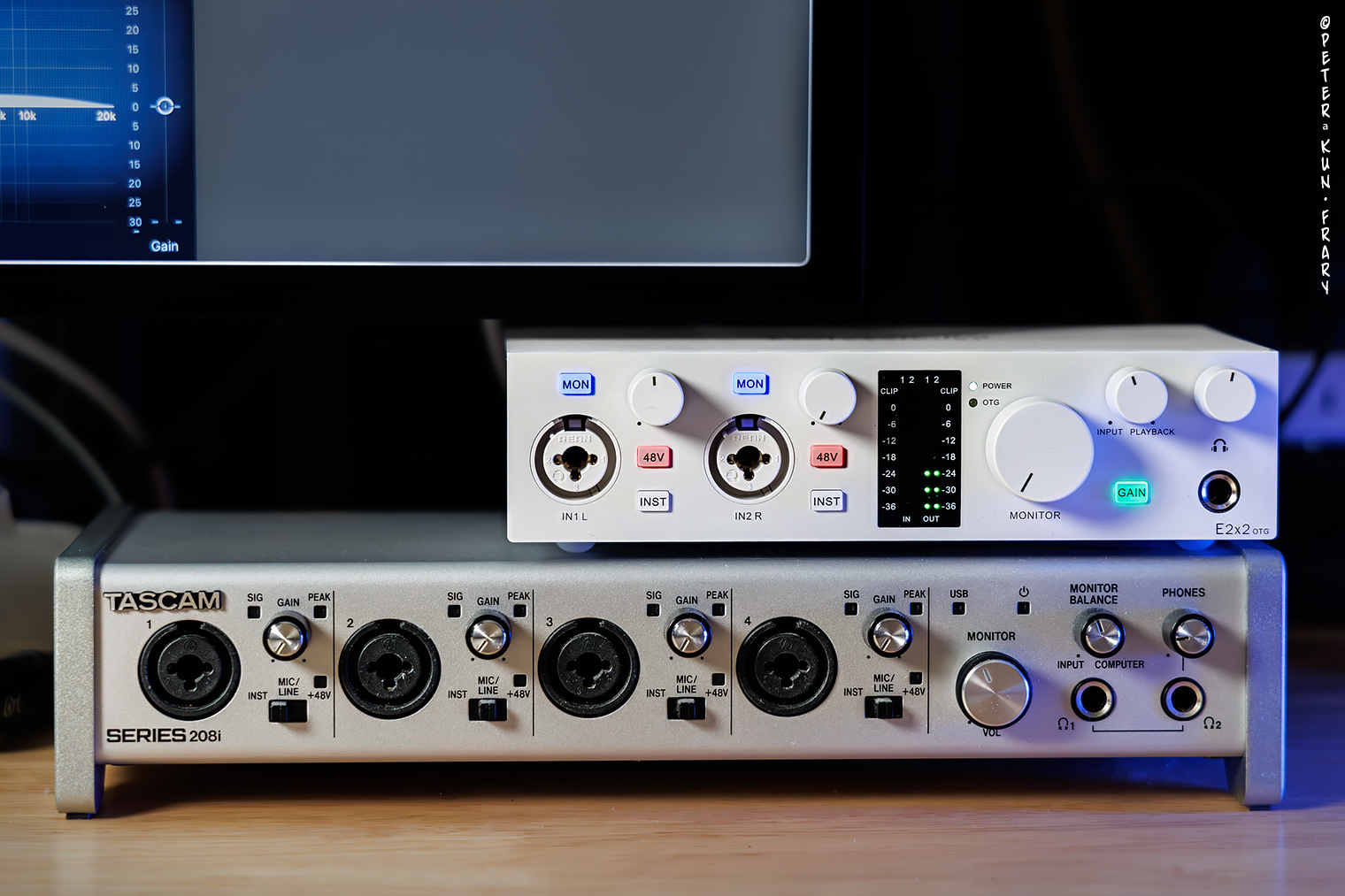
Tascam 208i | A Topping E2x2 OTG joy riding on the 208i.
RFI Resistance
Here in RFI infested downtown Honolulu, no static, clicks or rogue radio stations were heard on tracks recorded with the 208i. Indeed, I recorded within inches of my iPhone and heard no microwave chirps or RFI whatsoever.
Latency
Latency is a delay in the transmission of audio data, i.e., sound. To synchronize my playing with a multitrack recording, I monitor the tracks with headphones. If there is a significant sound delay in the headphones, more than 10 ms, my playing will lag behind the beat.
Zero Latency?
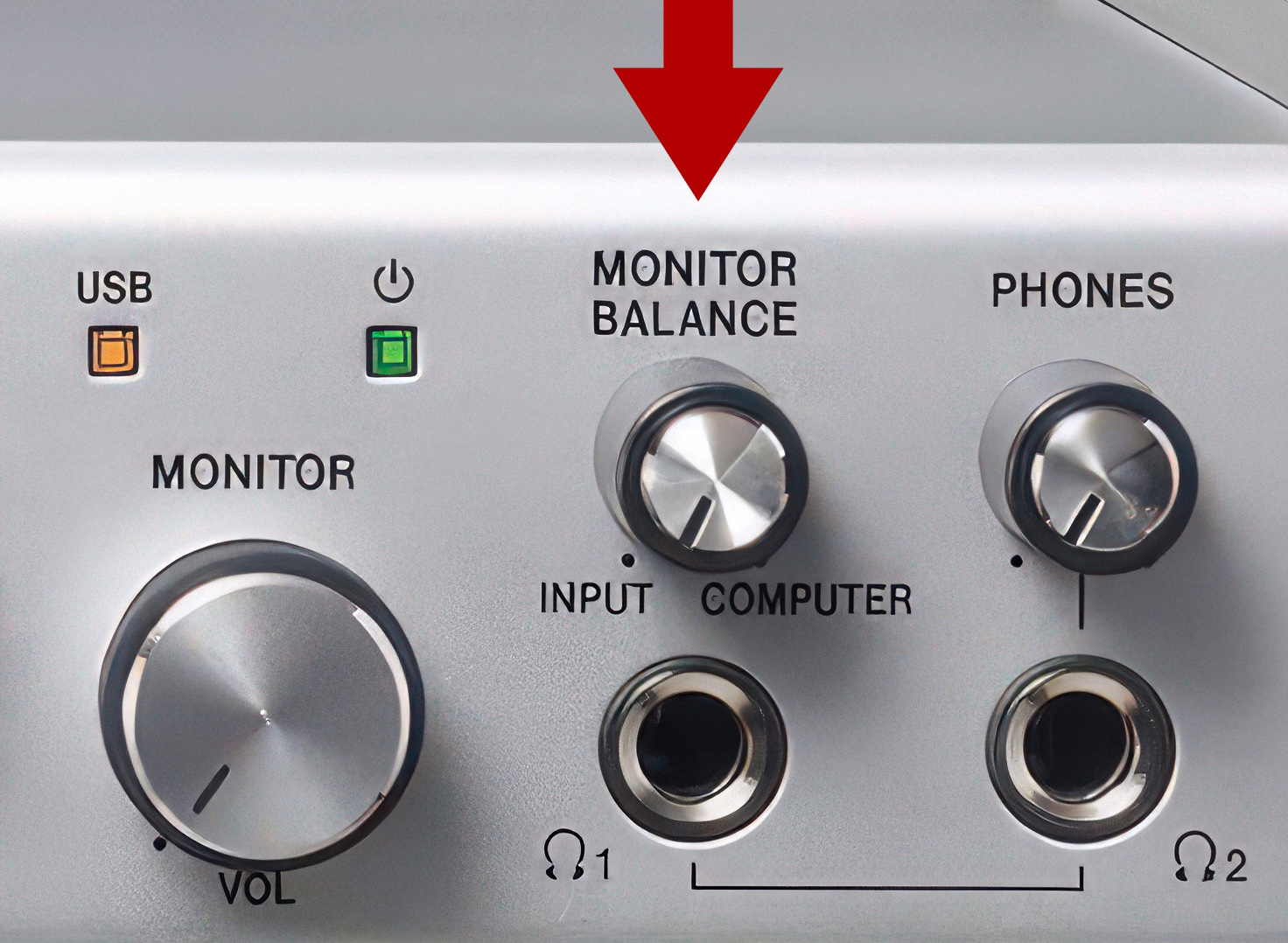
Direct monitoring with zero-latency is available on the 208i by rotating the Monitor Balance knob all the way to the left to INPUT. Thus set, you hear only your input, e.g., you playing or singing through your input channel. DAW tracks and/or the metronome click are muted. This setting is useless for multi-track recording where one needs to hear the backing tracks in order to synchronize playing. I only use the zero-latency input monitoring for a quick sound check: make sure the mic is in the optimal position, listen for sound bleed, etc.
Optimize DAW Settings
Latency is affected by the speed of the audio interface, DAW, and the computer. Thus, how you configure your DAW and computer affects latency.
Latency may be reduced by increasing the sampling rate and/or reducing the buffer size. With Logic Pro X set to 48 kHz with an I/O buffer size of 32 samples, the system calculates roundtrip time as 7.6 ms. I don't know how accurate this time is, but it's fast enough to synchronize my playing with the backing track. At 96 kHz and an I/O buffer size of 32 samples, roundtrip is estimated at 6.9 ms.
Higher sample rates and smaller I/O buffer sizes increase CPU demand. If pushed too far, recording dropouts may occur with slower CPUs. My Mac Studio M4 Max has no dropouts at any setting, but my MacBook Pro i5 didn’t fare as well.
You can also reduce latency by disabling DAW plugins during recording sessions.
Monitor Mix
For most recordings, I need to hear backing tracks, so I manage latency by mixing my direct (input) and DAW signals.
Use the Monitor Balance knob to adjust the balance between the input jacks (your playing) and the output from the computer. Set to the far right, you hear only computer playback. Set to the extreme left, you hear only the input signal and have zero latency. Latency may be minimized by combining input and computer sources in the monitor feed.
I prefer the mix at 10:00 to 11:00, with a little stronger input signal but with computer playback still audible.
Ode to Joy | Hirade TH8SS, Neumann KM 184 (2X), Tascam Series 208i and Logic Pro X | No latency issues when recording this guitar trio.
Logic has a low latency recording mode, further reducing the lag of backing tracks over headphones. With the above measures in place, latency has not been an issue for multitrack recording on the Tascam 208i.
Musings
Do recordings from the 208i sound better than my Tascam US 4x4? Honestly, they sound about the same. Preamps in the 208i have slightly less noise when cranked during pianissimo passages. On paper, the 208i has significant improvements in S/N ratio, crosstalk, etc., but those things didn't really jump out at me. The main improvements of the 208i over the 4x4 are user convenience features: lower latency, ADAT input expandability, individual phantom switches for each channel, a larger monitor balance knob, and the addition of 192kHz sampling. And the biggie: an on/off switch!
Alternatives
If you don’t require four XLR inputs, the Tascam 102i offers most of the style and features of the 208i in a smaller form factor (10-in/2-out) for less than half the price. Alternatively, if you prefer the 208i form factor but desire four XLR inputs without needing ADAT expandability or 8 TRS outputs, the Tascam US 4x4HR. No interest in MIDI or ADAT but want great audio quality? TheTopping E2x2 OTG might be your cup of tea (or beer).
Final Blurb
The Tascam Series 208i is well made, handsome, plug-and-play on Macs, expandable, simple to operate, reasonably priced, has an on/off switch, and records audio accurately and cleanly. And it works evertime I switch it on: no restarts or drivers needed.
 •••••••
 •••••••
 •••••••
 •••••••
 •••••••

 Controls

 Inputs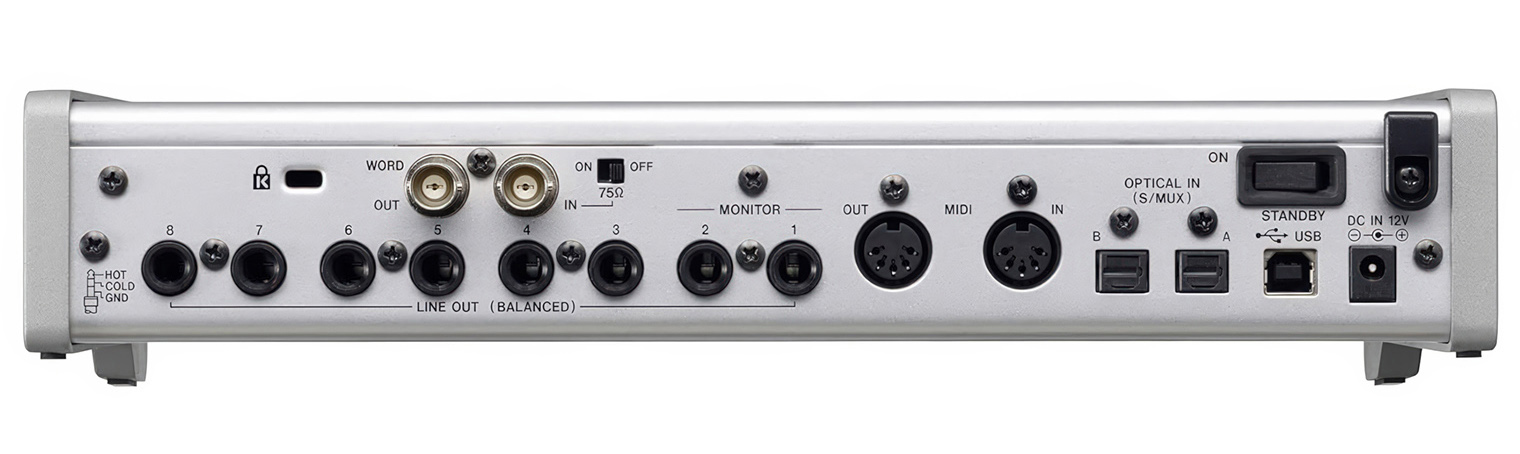
 Aggregate Device
  Outputs
 USB
USB No Mac Drivers Needed

 Sound Quality
Yellow Bird | Hirade TH90, Romero Creations Tenor 6, Neumann KM 184 (2X), Tascam Series 208i and Logic Pro X
RFI Resistance
 Latency
Zero Latency?
Optimize DAW Settings
Monitor Mix
 Musings
Alternatives
 Final Blurb

 Features and Specs
Included accessories
Size and Weight
Country of Origin
Instruction Manual
Price
Website